|
|
|
· |
|
|
|
1. Custom Transcribing |
|
Tablature can be provided for any song from any
recording. Solos or backup (if backup can be heard clearly
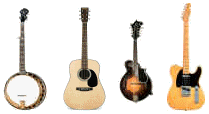
enough). This service is available for banjo, *guitar, mandolin,
and bass (electric or upright).
*guitar
- flatpicking only, no fingerpicking
- some electric guitar accepted (send recording)
|
|
4. A.C.T. Tablature List |
|
FREE list of over 600 banjo solos already transcribed.
These are sold at much lower prices than the custom transcribing
rate. All styles and playing levels are represented here by many
of your favorite players. Click below to view this list. This
should launch Adobe Acrobat Reader and load as PDF files. If
they do not load properly, you may need to download Adobe
Acrobat Reader. You can download this free program below.
Click
here to view the ACT TabList. |
|
|
|
U
P G R |
|
|
UPG1.
Tablature Recording (2 options) |
| a.
Recorded Instrument -
Tab is played (on the desired instrument) and recorded as an MP3
file so you can hear how it should sound. The tab will played
through at two speeds for ease of learning. This service can be
especially helpful when ordering Custom Composing. (Service no. 2 above)
b. MIDI audio file - This audio file of your tab
consists of computer generate tones that simulate instrument sound. Your
tab is entered note-by-note into "TablEdit", a special
computer program that can play the tab back at any speed and create
a MIDI file of the playback. This file can be played on "Windows
Media Player" through your computer speakers, as well as other
computer programs. With "Windows Media Player", you can
usually vary the playback speed of your MIDI file so you can hear
it (and play along, if you like) at different speeds. Although
the tone will not sound exactly like a real instrument, the
notes are 100% correct in pitch and timing. Most customers say it
works very well for them.
(Note: Pricing for Tab Recording differs depending on whether
it is an upgrade to a transcribing or composing order, or an order
strictly for Tab Recording.)
|
|
| |
|
HOME
| SERVICES
|
|
|
|
|
|
|
SERVICES |
|
|
|
2. Custom Arranging |
|
A solo or backup can be created to your specifications and written
out for any song you send. The song may already have a solo or
backup, but you may want something different that suits you. Or,
there may not be a solo on the instrument you desire.
Or, the
original recording may not contain any solo or backup at all.
Especially in the latter case, you may want to take advantage of
"Tablature Recording"
(Upgrade Option 1. below) so you can hear exactly how the
tablature should sound.
Please describe
in detail the type of solo or backup you prefer. (Examples:
1. simple beginner 2. advanced 3. lots of flashy licks 4.
basic, emphasizing melody, etc.) If you want to send a
sample of tablature with characteristics similar to the one you
are wanting composed, that can be helpful.
|
|
|
|
A
D E ·
O P T |
|
|
UPG2.
Rush Service |
| Your
order will be sent to you in 1 week or less from
confirmation order confirmation. "Confirmation"
means the point at which all questions about your order have
cleared up and work on the order can begin. Your tablature will
be sent by email within 1 week of that point. If, for any
reason, you tab should fail to be sent during the promised time
frame, your cost would drop to the regular rate.
Orders
at the regular rate are processed as timely as possible, in the
order they are received. Turnaround times normally vary from 2
to 3 weeks, however no guarantee can be made.
|
|
|
|
UPG5.
Lyrics with Tab |
|
Especially helpful
with Custom Arranging orders, lyrics are entered underneath the
tablature. Each word (or syllable) is lined up directly under the
note that represents it, giving you a better idea of where the
melody notes lie among the fill notes. This can make the
arrangement much easier to learn, especially if you have no
recording to go by.
|
|

|
BACK
TO TOP |
|
HOW
IT WORKS
| PRICES
| TABLIST
| TAB
SAMPLES
| F.A.Q. |
|
|
|
|
|
· |
|
|
|
3.
Chord Charts |
|
If you only need the chords to a particular song or
passage, these can be written out for you. Chord charts can be in
created in two different formats: 1) chord letter names, or 2)"Nashville
Number System". Click
here to see examples of chord charts.
|
|
5.
Tablature Recording |
|
Any tab you send is recorded as an audio file for you
so you can hear how the tab should sound. There are two types
of audio files available.
a. Tab is played on the desired instrument and recorded as an
MP3 file.
b. MIDI audio file of your tab is created consisting of
computer generate tones that simulate instrument sound.
There are advantages to both. See Upgrade
Option 1 below for more details. |
|
|
I
O N S |
|
|
UPG3.
Printed Tab |
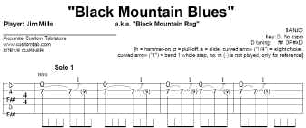
| Your
tab is entered note-by-note into "TablEdit", a special
computer program that displays a very professional, publishing
quality version of your tablature that can be viewed clearly on your
computer and can easily be printed out. Click
here for more information about this option. |
| NEW!
"Printed Tab" is now a FREE upgrade. |
|
|
UPG4.
TablEdit File |
Your
tab is entered into "TablEdit", a computer program that offers
printing and MIDI tools as well as the ability to edit the
tablature in many different ways. This creates a TablEdit (.tef)
file. NOTE: You must have "TablEdit" installed on your
computer to access full editing capabilities for this file. However,
a free version of TablEdit ("TEF Viewer") is available for
free download on the Internet. This program is basically for
viewing tablature, although you can play the tab as a MIDI and print it.
For more info on "TablEdit" and "TEF Viewer"
software, visit the TablEdit site. |
|
| |
| |
ABOUT
| CONTACT
| ABOUT
| CONTACT |
|
|